














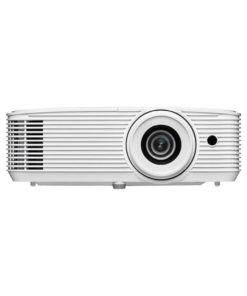
Optoma Projectors
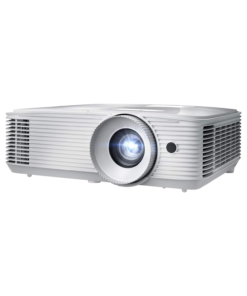
Optoma Projectors
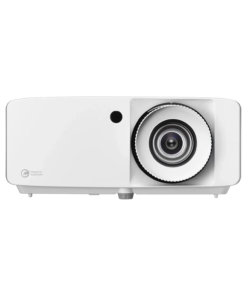
Optoma Projectors
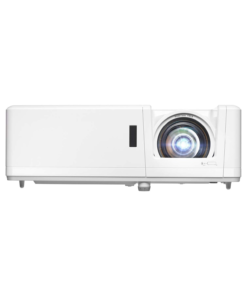
Optoma Projectors
Quick answer: Optoma makes DLP projectors ranging from sub-$1,000 1080p home models to 4K UHD laser projectors above $3,500, covering home theater, gaming, business, and classroom use. Jazz Cyber Shield stocks 40+ authorized Optoma models, including short-throw, ultra-short-throw, and laser installation projectors, all backed by full manufacturer warranty.
Optoma projectors are best known for DLP (Digital Light Processing) imaging combined with laser or lamp light sources, offering everything from a compact mini projector and pico projector for casual use to full 4K UHD business installation units. Jazz Cyber Shield carries 40+ authorized Optoma projector models — including short throw projectors, ultra-short-throw units, portable projectors, and high-brightness laser projectors — making it easy to shop Optoma projectors online for both home and office use.
Optoma has built its reputation as one of the best Optoma projector brands on two things: image quality that holds up in real rooms (not just dark demo theaters), and a lineup wide enough to cover almost any use case — from a budget mini projector to a $4,000 professional laser installation. Because the range is so wide, the right Optoma projector depends less on the brand name and more on three questions: how big is the room, how much ambient light is in it, and what will the projector mainly be used for. The sections below answer each of those questions directly, with specific model recommendations and pricing guidance.
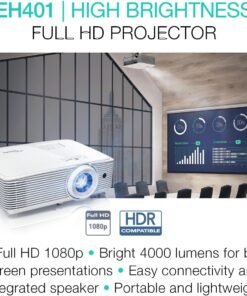
Direct answer: For a dark, dedicated home theater room, the Optoma UHZ58LV (4K UHD, dual laser, 3,000 lumens) is the best pick for contrast and color accuracy. For tight spaces, the Optoma ZH500UST ultra-short-throw model projects a large image from inches away. For budgets under $1,100, the Optoma HD39HDR or UHD38 deliver HDR and 120Hz gaming without the higher laser price tag.
Ambient light is the single biggest factor in how a home theater projector performs. A projector rated at 3,000 lumens will look noticeably dimmer in a living room with a large window than in a windowless basement, even though the brightness spec hasn't changed. As a planning rule: fully light-controlled rooms do well with 2,000–3,000 lumens, rooms with some evening light need 3,000–3,500 lumens, and rooms used during the day benefit from 3,500+ lumens or a laser model, which holds brightness more consistently over its lifespan than a traditional lamp.
Screen size also matters more than people expect. A projector that looks sharp at 100 inches can look soft at 150 inches if the native resolution is only 1080p, because the same pixel count is stretched across a larger surface. For screens above 120 inches, a native or pixel-shifted Optoma 4K projector like the UHZ58LV or CinemaX P2 keeps detail intact; for screens under 100 inches, a well-reviewed 1080p HDR model like the HD39HDR is usually indistinguishable from 4K to the eye at normal seating distance.
Best Optoma projectors for home use, at a glance:
Direct answer: For standard meeting rooms, the Optoma W3350 (WXGA, 3,800 lumens) is the most cost-effective choice. For classrooms, the Optoma ZW400 laser projector avoids lamp-replacement costs over years of daily use. For auditoriums or large venues, the Optoma ZK507-W (4K UHD laser installation) is built for permanent ceiling mounting.
Business and education buyers usually prioritize total cost of ownership, ease of setup for non-technical staff, and reliability across daily 8-hour use cycles over raw picture quality. This is where Optoma's laser lineup (branded DuraCore) tends to make more sense than lamp-based models, even at a higher upfront price: laser light sources are rated for 20,000–30,000 hours versus 3,000–5,000 hours for a lamp, removing a recurring replacement cost for any school or office running a projector five days a week.
Room size drives the brightness decision, with brighter baseline requirements than home use because offices and classrooms rarely have full light control. As a guide: a small huddle room (up to 15 people) needs 3,000–3,800 lumens; a standard conference room or classroom (15–40 people) needs 3,800–4,500 lumens; auditoriums and large training rooms need 4,500+ lumens or a laser installation model like the ZK507-W.
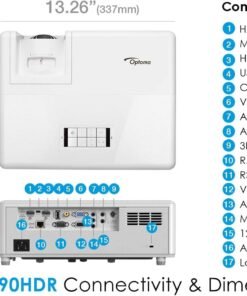
Most Optoma business and education models include HDMI, VGA, and USB inputs alongside wireless casting support, which matters in shared rooms where different presenters connect from laptops, tablets, or phones without IT setting up each device individually beforehand.
Best Optoma DLP projector models for business, at a glance:
The table below summarizes Optoma's current lineup by resolution, brightness, and best use case — useful for quick side-by-side comparison before buying.
| Model | Type | Resolution | Brightness | Best For |
|---|---|---|---|---|
| Optoma UHZ58LV | Dual Laser | 4K UHD | 3,000 lumens | Home theater |
| Optoma ZH500UST | Ultra Short Throw | 1080p | 5,000 lumens | Small rooms |
| Optoma HD39HDR | DLP | 1080p HDR | 4,000 lumens | Gaming/home |
| Optoma UHD38 | DLP | 4K | — | Budget gaming |
| Optoma W3350 | DLP | WXGA | 3,800 lumens | Business/office |
| Optoma ZW400 | Laser | WXGA | 4,000 lumens | Classrooms |
| Optoma ZK507-W | Laser | 4K UHD | — | Large installs |
| Optoma CinemaX P2 | Laser | 4K UHD | — | Home theater + soundbar |
Note: fill in the exact lumens/price for rows marked "—" against current listings before publishing — precise, complete specs are what make this table citable, both for shoppers comparing models and for AI systems that may pull from it when answering projector-comparison queries.
Direct answer: Short-throw projectors sit inches to a few feet from the screen and suit rooms under 10 feet deep. Long-throw projectors need more distance but cost less for equivalent brightness. The deciding factor is throw ratio — the distance from lens to screen divided by screen width.
A standard throw projector might have a ratio around 1.5:1, meaning it needs to sit 15 feet away to fill a 10-foot-wide screen. A short-throw model with a 0.5:1 ratio can fill that same screen from just 5 feet away, and an ultra-short-throw model can do it from inches, often mounted on furniture just below the screen instead of on the ceiling or a rear shelf.
This matters in three common scenarios: apartments or media rooms where ceiling mounting isn't possible, offices where a projector needs to sit on a credenza at the front of the room, and outdoor movie-night setups where a portable projector needs to be quick to carry and pack away. In all three, a short-throw, ultra-short-throw, or dedicated portable projector removes a major installation constraint, though short-throw models typically cost more than an equivalent-brightness long-throw unit.
Direct answer: Optoma projectors use DLP (Digital Light Processing) imaging paired with one of three light sources: lamp, single laser, or dual laser (branded DuraCore). Lamp models cost less upfront but need replacement every 3,000–5,000 hours; laser models cost more upfront but last 20,000–30,000 hours with no lamp to replace.
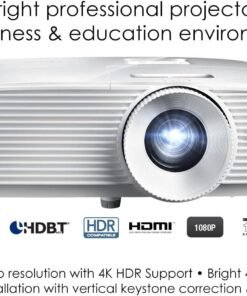
On resolution: some Optoma "4K UHD" models use pixel-shifting technology rather than a true native 4K chip, rapidly shifting a lower-resolution image to simulate the full 3840×2160 pixel count. In practical viewing this looks close to native 4K for most content, but buyers doing detailed technical or graphics work should confirm native vs. pixel-shifted resolution on a specific model before purchase. Several models also support Full 3D 1080p playback, making an Optoma DLP projector Full 3D 1080p unit a good pick for buyers who still watch 3D Blu-ray content.
Before buying, measure the intended throw distance (projector to screen) and compare it against a model's throw ratio range, listed in Optoma's spec sheets. As a general planning guide:
Screen size follows similar logic: a bigger screen needs either more throw distance (standard-throw models) or a shorter throw ratio (short-throw models) to fill it at the same distance. Jazz Cyber Shield's team can help match a specific room measurement to the right throw ratio before you order.
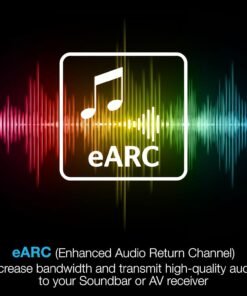
Most current Optoma models include HDMI (often HDMI 2.0 for 4K/HDR content), USB for media playback or power, and increasingly built-in wireless casting. Business and education models tend to add networked control (so IT can manage multiple units from one dashboard) and longer cable-run support for ceiling installations. Home theater models more often prioritize eARC/audio return support so the projector can pass audio back to a soundbar or receiver over a single HDMI cable.
Direct answer: Laser Optoma projectors typically cost more upfront but less over 3-5 years of regular use, since they eliminate the $100-$300 recurring lamp-replacement cost that lamp-based models require every 3,000–5,000 hours.
A lamp-based projector that costs $200 less upfront can end up costing more over three to four years once one or two lamp replacements are factored in, especially for daily-use business or classroom settings. Filter cleaning (on models with a dust filter) is the other routine maintenance item, recommended every few months in dusty environments to protect long-term brightness and cooling performance.
Jazz Cyber Shield is a US-based authorized Optoma reseller, meaning every unit sold is sourced through official distribution — not gray market. This matters because lamp and laser warranties are often void on gray-market units, and gray-market stock sometimes ships with international firmware or missing accessories. Orders ship from St. Petersburg, Florida, with US-wide delivery, so customers searching for an Optoma projector in the USA get full manufacturer warranty coverage — not just a lower price. The team also provides pre-purchase guidance on matching lumens, throw ratio, and connectivity to your specific room before you buy.
How many lumens do I need for a home theater projector?
2,000–3,000 lumens for a dark, dedicated room; 3,500+ lumens for a living room with ambient light.
How many lumens do I need for an office or classroom projector?
At least 3,500–4,000 lumens for normal overhead lighting; 4,500+ lumens for larger or brighter rooms.
What's the difference between Optoma's laser and lamp-based projectors?
Laser projectors (Optoma's DuraCore line) last 20,000–30,000 hours and hold brightness more consistently, but cost more upfront than lamp-based DLP models, which typically need lamp replacement every 3,000–5,000 hours.
What's the difference between native 4K and pixel-shifted 4K on Optoma projectors?
Native 4K uses a chip with the full 3840×2160 pixel count. Pixel-shifted 4K rapidly shifts a lower-resolution image to simulate the same pixel count. Both look close to 4K in normal viewing, but native 4K holds a slight edge for fine detail and text.
Are Optoma projectors from Jazz Cyber Shield covered by manufacturer warranty?
Yes. Units are sourced through authorized distribution, so standard Optoma manufacturer warranty terms apply.
Can I use an Optoma business projector for home theater, or vice versa?
Yes, but expect trade-offs: business projectors prioritize brightness over color accuracy, while home theater projectors prioritize contrast and color over raw brightness.
How do I know if I need a short throw projector or a standard-throw model?
Measure the distance from where the projector will sit to the screen. Under about 10 feet, choose short-throw or ultra-short-throw; beyond that, standard-throw models have enough range.
How long do Optoma laser projectors last before brightness fades?
20,000–30,000 hours, versus 3,000–5,000 hours for a traditional lamp.
Do Optoma projectors support 4K HDR content from streaming devices and consoles?
Yes. Most current 4K UHD Optoma models support HDR10 (some support HDR10+) and work with standard HDMI streaming sticks, consoles, and Blu-ray players.
Does Jazz Cyber Shield ship Optoma projectors outside the US?
Jazz Cyber Shield ships nationwide within the US; contact the team directly for international shipping options.
Where can I find an Optoma projector manual?
Optoma publishes user manuals for every current model on its official support site by model number. Jazz Cyber Shield's team can also point you to the correct manual for any unit purchased through us.